From the Project Properties dialog you can define general options that will apply to all SPT files of a project.

Project properties dialog
In the Project Identification area you can input general information about the project such as the project and client name and a description for the project location. This information will appear on the first page of the SPT file report. The software provides support for both SI and Imperial unit systems and you can switch between the two any time by selecting the appropriate radio button in the Unit System area. When changing the unit system the software will try to convert input data to the selected unit system.
Use Other Properties section do define whether you wish the software to draw on the background of the plots the input soil layers. There are 4 major categories with a corresponding user defined color, painting of these areas is enabled or disabled if the Use Soil Colours in Plots check box is checked or unchecked respectively.
When the Allow Pick Capacity is checked the software will allow to hand pick a bearing capacity for a given depth which will appear in the first page of the pile capacity report.
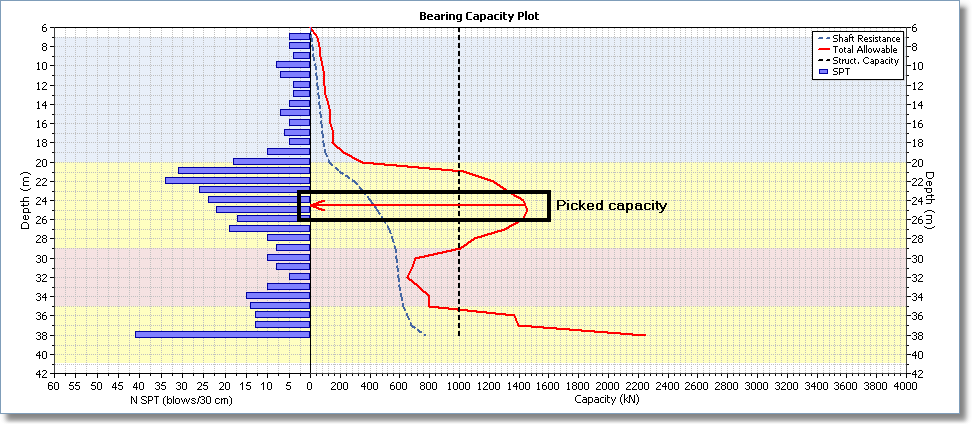
Picked bearing capacity
In the User Information section you can input your company information and logo to be printed in the capacity report.
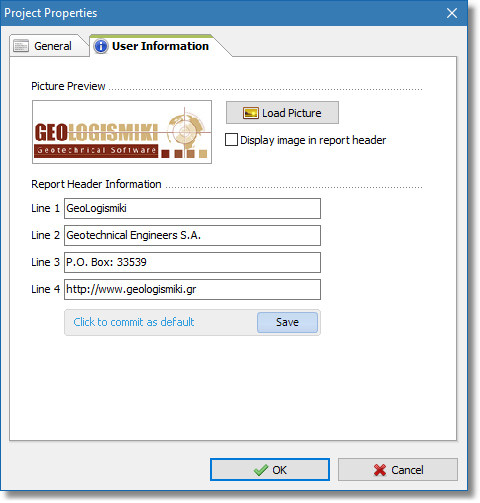
User information section