Click on the  button to bring up the properties dialog:
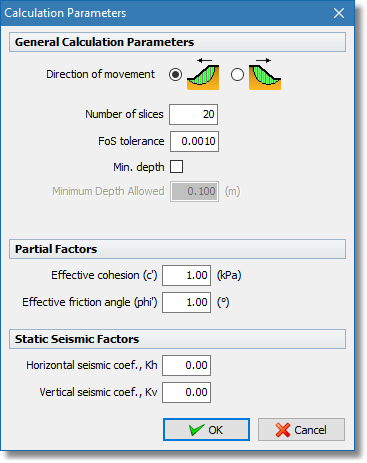
General properties dialog
•Direction of movement: The software will use the ground surface object to auto detect the direction of movement but in case the result is not correct you can manually define this by clicking the appropriate radio button.
•Number of slices: The number of slices the software will try to create in order to perform the Factor of Safety calculation. The actual total number of slices will depend on the number of points on the failure surface needed for the calculation.
•FoS tolerance: This number is used as the convergence criterion of the Factor of Safety calculation procedure. When two successive FoS calculations lead to a difference less than the tolerance number then we assume convergence and the procedure is stopped.
•Min. depth: When checked the software will reject failure surfaces that contain slices with a height less than the Minimum Depth Allowed/
•Minimum Depth Allowed: Minimum height a slice must have in order to be accepted.
•Partial Factors: The software will divide soil material mechanical properties by the factors input here.
•Static Seismic Factors: To analyze the seismic response of slopes the software uses the horizontal and vertical seismic coefficients.