The Search Properties dialog contains variables useful for fine tuning the automated search procedure. Click on the  button and the following dialog will appear:
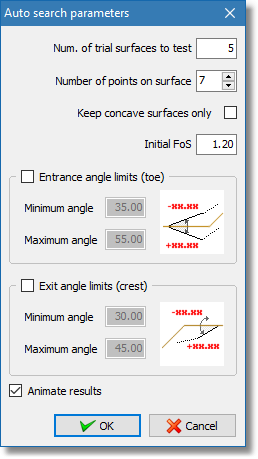
Search properties dialog
•Num. of trial surfaces to test: The software will try to generate the given number of initial random trial slip surfaces that will be used for the location of the critical slip surface.
•Number of points on surface: All initial random trial slip surfaces are generated having 4 points only but while the software refines the surface towards to locating smaller FoS it will add points on the surface to match the number specified. The more points on the trial surface the better kinematically admissible this will be but also there will be a time penalty on the search procedure.
•Keep concave surfaces only: Concave slip surfaces are generally accepted as physically more acceptable but you can allow the software not to reject surfaces that are not concave by unchecking this selection.
•Initial FoS: Calculation of the factor of safety is based on a minimization routine according to Newton & Raphson technique. The proposed default value of the initial FoS that will be used is sufficient for the vast majority of the slope stability problems but there are cases where a smaller number can help the software overcome local minimum issues in the minimization procedure.
•Entrance and Exit limits: In the procedure to minimize the factor of safety for a given trial surface the software will freely move surface points to any direction. You can add a constrain for the first and last segment of the slip surface polyline based on the angle they can form with the free ground surface object.
•Animate results: When checked the software will draw the best critical surface located while the search procedure is executed.