After you have selected the SPT file from the Boreholes list, you can begin to input raw SPT data in the table cells of the Input Data section. The software needs input for test depth, number of blows and soil type description. By entering data on the table, hitting the Return key on your keyboard will advance the active cell, making input of data more easy. According to the calculation method of the SPT file, a list of the available soil type description will appear when you enter the Soil Type cell (or when you click on it).
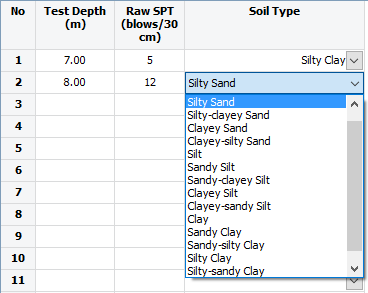
Soil type selection list
Once you have input all your SPT data you must input the pile properties in the Pile Properties section. The properties are:
•Length: The length of the pile that will be used to perform the calculations. The software will begin the bearing capacity calculations from the depth that corresponds to the very first Test Depth entry (line 1 on the input data table) down to the length of the pile.
•Tip Diameter: The tip diameter to be used for the tip area calculation.
•Shaft Diam.: Shaft diameter to be used in the unit friction area calculation.
•Rock Socket Diam.: If the pile is to be driven in rock you can additionally input the socket diameter.
•Type: Pile type selection list (depends on the selected calculation method method).
•Max Tip: A user defined limitation of the calculated unit tip resistance q. If the calculate q is greater than the maximum tip then it is limited to that value.
•Struct. Cap.: You can input the structural capacity of your pile to be plotted on the bearing capacity plots.
Once you input all necessary data you need to click on the Commit Changes button  and the software will create a preview of your SPT profile.
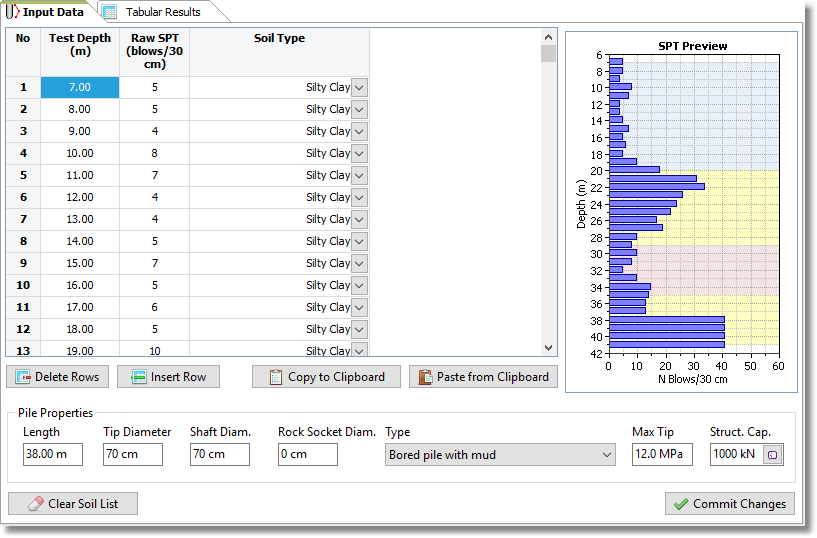
SPT preview